AI SalesCopilot
An AI sales assistant that researches each prospect and drafts outreach across email, LinkedIn and WhatsApp, with a review queue where a rep edits and approves drafts before they send - plus a Chrome extension that works inside Gmail and LinkedIn.
Case study by Balaji Sankar · Updated October 2026
Release environments for both app and extension
Outreach channels on one sequence model
Over two years of continuous releases on a codebase I carried from early builds
Why did it need to exist?
- Reps spend hours researching and writing each message
- Every channel needs the same work done again
- Teams will not let AI message buyers unsupervised
- Reps spend their day in Gmail and LinkedIn, not in a sales app
- AI researches prospects and drafts personalised outreach
- One sequence model across email, LinkedIn and WhatsApp
- A review queue where a rep approves drafts before they send
- A Chrome extension inside Gmail and LinkedIn
What made it hard?
Sales reps spend most of their day on research and writing, not selling. Every prospect needs looking up and a message that doesn’t read like a template - then again on LinkedIn, again on WhatsApp and again for the follow-up.
The client wanted AI to do that groundwork, but no sales team will let a model message real buyers unsupervised. The product had to make AI drafting fast while keeping a human firmly in the approval seat, and it had to show up where reps already work.
How did I approach it?
Make approving faster than writing
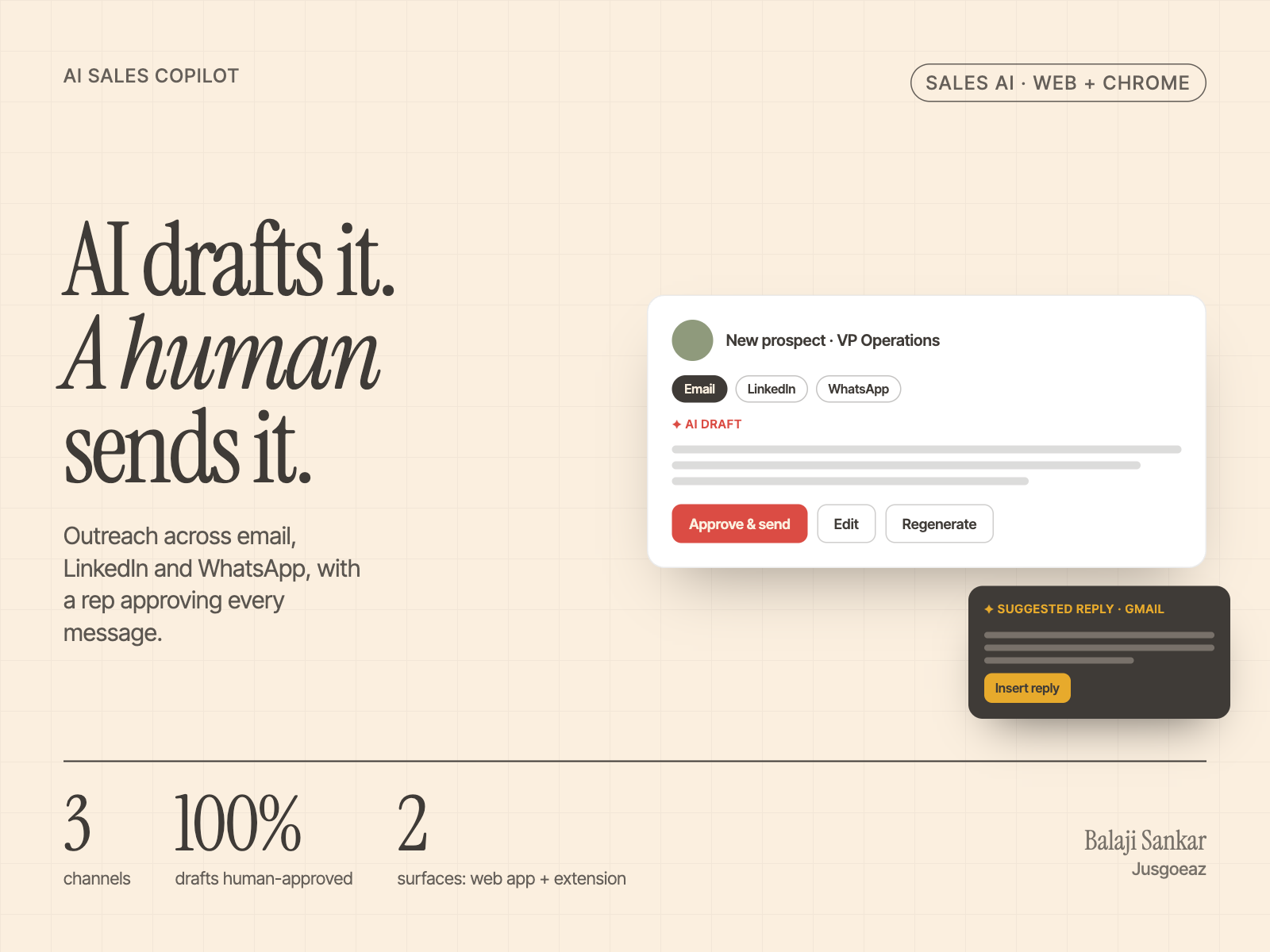
AI drafts set for review land in a review queue where the rep can edit them in a rich-text editor, regenerate, reschedule or discard, then "approve & review next" to move through a batch. Inbound replies get the same treatment in a threaded view.
One sequence model, three channels
Email, LinkedIn and WhatsApp steps share one payload and UI model, with per-channel actions, daily limits and timezone-aware scheduling, so new channels slot in without rebuilding the flow.
Live where reps work
A Manifest V3 extension with a content-script shell that injects into Gmail and LinkedIn, and a React side panel rendered inside a Shadow DOM so neither page can break the other.
Release discipline
Dev, QA, UAT and production builds for both the app and the extension, shipped through a PR-based flow over more than two years of continuous releases.
Which calls shaped it?
Design around the review step
If approving a draft is slower than writing one, reps simply stop using the AI.
Drafts set for review land in a review queue with inline editing, regenerate, reschedule and an "approve and review next" flow; inbound replies get the same treatment.
- Review before sending is a setting on autopilot work, bulk personalisation and the inbound agent
- Reps move through batches quickly
- One workflow for outbound and inbound
One payload for three channels
Building email, LinkedIn and WhatsApp as separate flows would multiply UI and logic.
Steps for all three channels share a single sequence payload and UI model, with per-channel actions and limits.
- New channels slot in without a rebuild
- Consistent scheduling and daily limits
- One calendar view of everything queued
Shadow DOM for the extension
Gmail and LinkedIn re-render constantly and their styles can break injected UI, or be broken by it.
A content-script shell injects into the page and renders a React side panel inside a Shadow DOM.
- Host styles cannot leak into the panel
- The extension cannot break the host page
- A MutationObserver re-injects the button as Gmail re-renders
What did I build?
- (01)
Human-in-the-loop AI designed as a product pattern, for both outbound drafts and inbound replies.
- (02)
Gmail: an assistant button in the compose and reply toolbars that reads the open thread and suggests a reply, and holds up as Gmail re-renders the compose window.
- (03)
LinkedIn: prospect insights, talking points and icebreakers for the profile being viewed, with one-click add to prospects.
- (04)
Token hand-off from the web app to the extension so users never log in twice.
- (05)
An inbound SDR agent setup, an AI coach for call scripts and practice sessions, and AI chat over company knowledge.
What is it built on?
Human in control
Give reps a fast way to review AI drafts before they reach a buyer.
Work where reps already are
Bring the assistant into the inbox instead of asking reps to switch tools.
One component system
Keep the same page structure and components as the product grows.
How was it delivered?
- Phase 1
Core web app
CRM lead and people views, ideal-customer targeting on kanban boards and the first sequence screens.
- Phase 2
Chrome extension
Gmail reply suggestions and LinkedIn profile insights, with shared sign-in from the web app.
- Phase 3
Coaching, prospects and knowledge chat
An AI Coach for call scripts and practice sessions, a prospect workspace with CSV import and field mapping, and AI chat over company knowledge.
- Phase 4
Agents, review queue and WhatsApp
An inbound SDR agent with calendar booking, the review queue with approve-and-next, WhatsApp steps and bulk CSV outreach.
- Ongoing
Continuous releases
Separate dev, QA, UAT and production builds for app and extension through a PR-based flow for more than two years.
What did I learn?
Speed of review is the product
The value of AI drafting depends on how quickly a rep can say yes, edit or regenerate.
Isolate anything injected
Shadow DOM made it possible to live inside two very busy third-party pages.
Release discipline scales
Separate environments and versioned packages kept two years of releases safe.
Questions about this project
- What did Balaji Sankar build in the AI Sales Copilot project?
- An AI sales assistant that researches each prospect and drafts outreach across email, LinkedIn and WhatsApp, with a review queue where a rep edits and approves drafts before they send - plus a Chrome extension that works inside Gmail and LinkedIn.
- Who was the client?
- An AI sales-technology SaaS company, in sales tech / AI SaaS. The work is under NDA, so the client is not named.
- What was the hardest part?
- Sales reps spend most of their day on research and writing, not selling. Every prospect needs looking up and a message that doesn’t read like a template - then again on LinkedIn, again on WhatsApp and again for the follow-up.
- What was his role?
- Frontend lead on the web app and Chrome extension.
- What technology was used?
- React 18, TypeScript, TanStack Query, Ant Design, MUI, Tailwind, Recharts, Quill, Chrome Extension MV3, Shadow DOM and Netlify.
- What were the results?
- 4 release environments for both app and extension, 3 outreach channels on one sequence model and Over two years of continuous releases on a codebase I carried from early builds.
Have a project like this?
Tell me what you’re building or what’s broken. I’ll tell you straight whether I’m the right person for it.