Learning HabitApp
A platform that helps children build a daily learning habit: a playful learner app with schedules, journals and voice answers, and a console where parents approve content and experts give feedback.
Case study by Balaji Sankar · Updated October 2026
Working relationship with the same codebase family
Much of the second-generation learner app built by me, plus long-running work on the parent and expert console
Why did it need to exist?
- Children, parents and experts in one product
- Children need fun; adults need efficient tools
- Content must not reach a child unapproved
- Young children struggle to type answers
- Three surfaces from one product family
- Two design languages: playful and calm
- Approval flows built into the main journey
- In-browser voice answers with expert replies
What made it hard?
The client wanted children to learn a little every day outside school, with parents involved and real experts reviewing their work.
That meant three audiences with very different needs - children who need something playful and simple, parents who want control and visibility, and experts who create content and give feedback - all kept safe for children, with adult supervision built into the content flow.
How did I approach it?
A console for the adults
Content, activities, libraries, collections and playlists with age-based defaults, plus learning-centre enrolment, student and parent management, reports and progress sharing.
Child safety as a workflow
Parents approve content before children see it, with request-approval flows and notifications built into the pipeline rather than bolted on.
A learner app made for kids
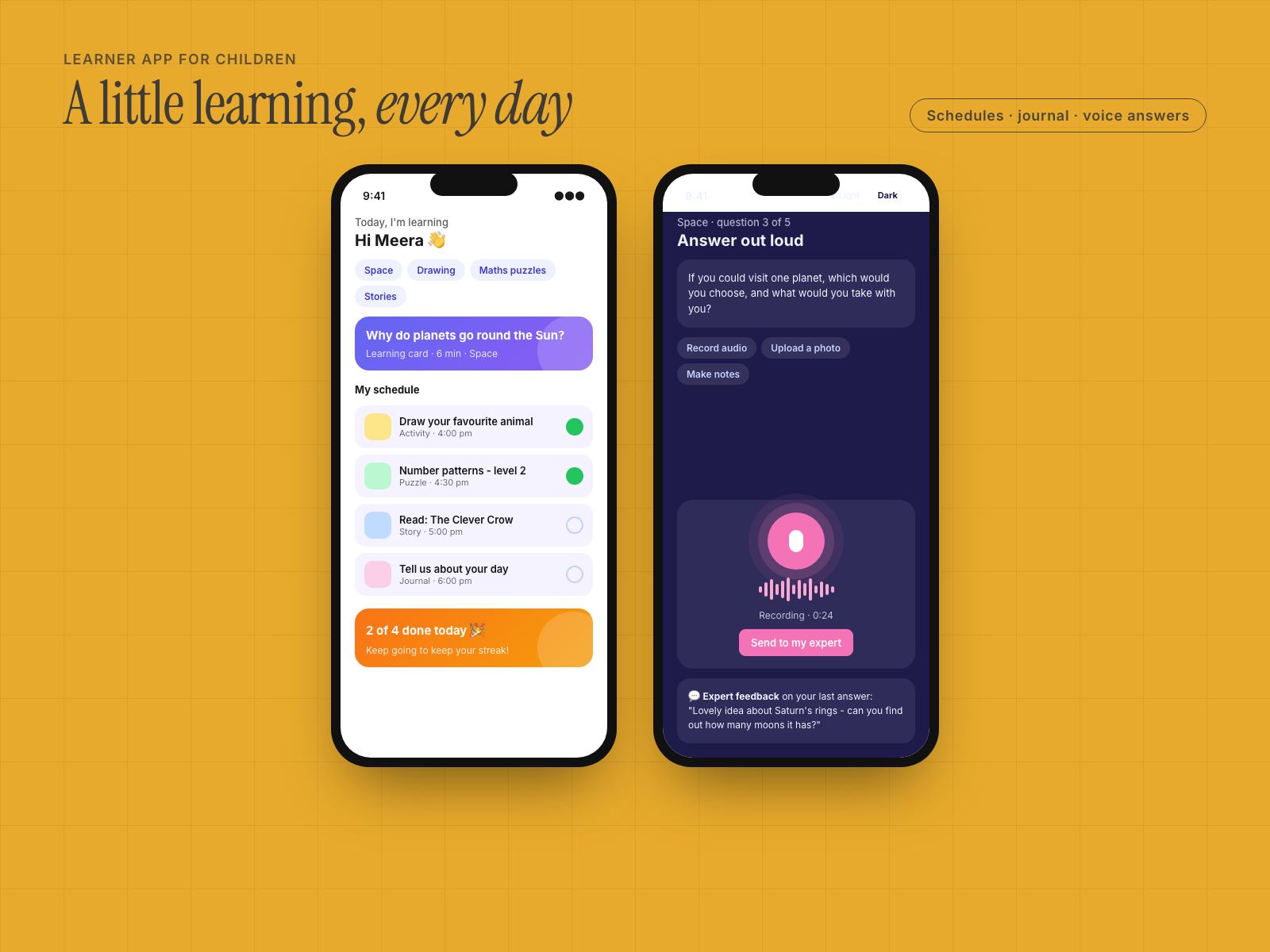
I built much of the second-generation learner app: explore and search, interests, a daily schedule, a personal journal, wishlist and workshops, with dark and light themes and celebration moments for finished work.
Answers without typing
In-browser voice recording so young children can answer out loud, with audio feedback from experts.
Which calls shaped it?
Two design languages
One visual style could not serve young learners and busy experts reviewing many answers at once.
I gave the learner app bright cards, confetti moments and light and dark themes, and the console a sober, data-dense layout.
- Children get a playful, rewarding app
- Parents and experts get a fast tool for approvals and reports
- Each audience stops fighting the other's interface
Safety as a workflow
Parents needed control over what reached their child, but a settings page would be ignored.
Children request content and interests, parents approve them, and only then do they appear, with notifications at each step.
- Nothing reaches a child without adult approval
- Approvals happen in the normal flow, not in settings
- Parents stay informed through notifications
Voice-first answers
Typing is the biggest barrier for young children answering questions.
I added in-browser audio recording so children answer out loud, and experts listen and reply with feedback.
- Younger children can take part fully
- Experts give richer, spoken feedback
- Answers become a conversation, not a form
What did I build?
- (01)
One product designed for two very different users: playful for children, sober and controlled for parents and experts.
- (02)
Adult supervision and approvals built into the content pipeline.
- (03)
In-browser audio responses for young learners.
- (04)
Parent and child login, learning-centre switching, free trial and online payments.
- (05)
Marketing site and subscription email work alongside the apps.
What is it built on?
Design for each audience
Children, parents and experts each get an interface built for how they actually use it.
Safety in the main flow
Protection works best when it is part of the journey, not a hidden setting.
Content as building blocks
Activities, libraries, collections and playlists combine and reuse with sensible age defaults.
How was it delivered?
- Phase 1
Console foundations
Parent, learning-centre and expert console with students, enrolment, invites and content creation.
- Phase 2
Approvals and safety
Request-approval flows for content, interests and workshops, with notifications.
- Phase 3
Voice and feedback
Audio responses in the browser and expert review and feedback loops.
- Phase 4
Learner app rebuild
In 2021-22, the learner app rebuilt with explore, schedule, journal, wishlist, cart and workshops.
- Phase 5
Payments and growth
Free trials, Razorpay payments for subscriptions and workshops, and the marketing site.
What did I learn?
One product, many moods
Splitting the design language by audience made both sides better rather than compromising each.
Voice removes the barrier
Letting children speak their answers opened the product to children who could not yet type comfortably.
Long engagements compound
Five years on one product family meant every rebuild built on what I had already learned.
Questions about this project
- What did Balaji Sankar build in the Learning Habit App project?
- A platform that helps children build a daily learning habit: a playful learner app with schedules, journals and voice answers, and a console where parents approve content and experts give feedback.
- Who was the client?
- A children’s learning platform, in edtech / K-12. The work is under NDA, so the client is not named.
- What was the hardest part?
- The client wanted children to learn a little every day outside school, with parents involved and real experts reviewing their work.
- What was his role?
- Long-running frontend engineer across all surfaces.
- What technology was used?
- React, Apollo Client, GraphQL, Ant Design, styled-components, Formik, Recharts, Razorpay and Next.js.
- What were the results?
- 5 yrs working relationship with the same codebase family and Much of the second-generation learner app built by me, plus long-running work on the parent and expert console.
Have a project like this?
Tell me what you’re building or what’s broken. I’ll tell you straight whether I’m the right person for it.